
Service App Authorization
To allow our connector to pull your Webex Contact Center Data, it is necessary to authorize our Service App. Please follow the steps below to grant us access.
Prerequisites
Administrator access to Control Hub.
Authorization steps
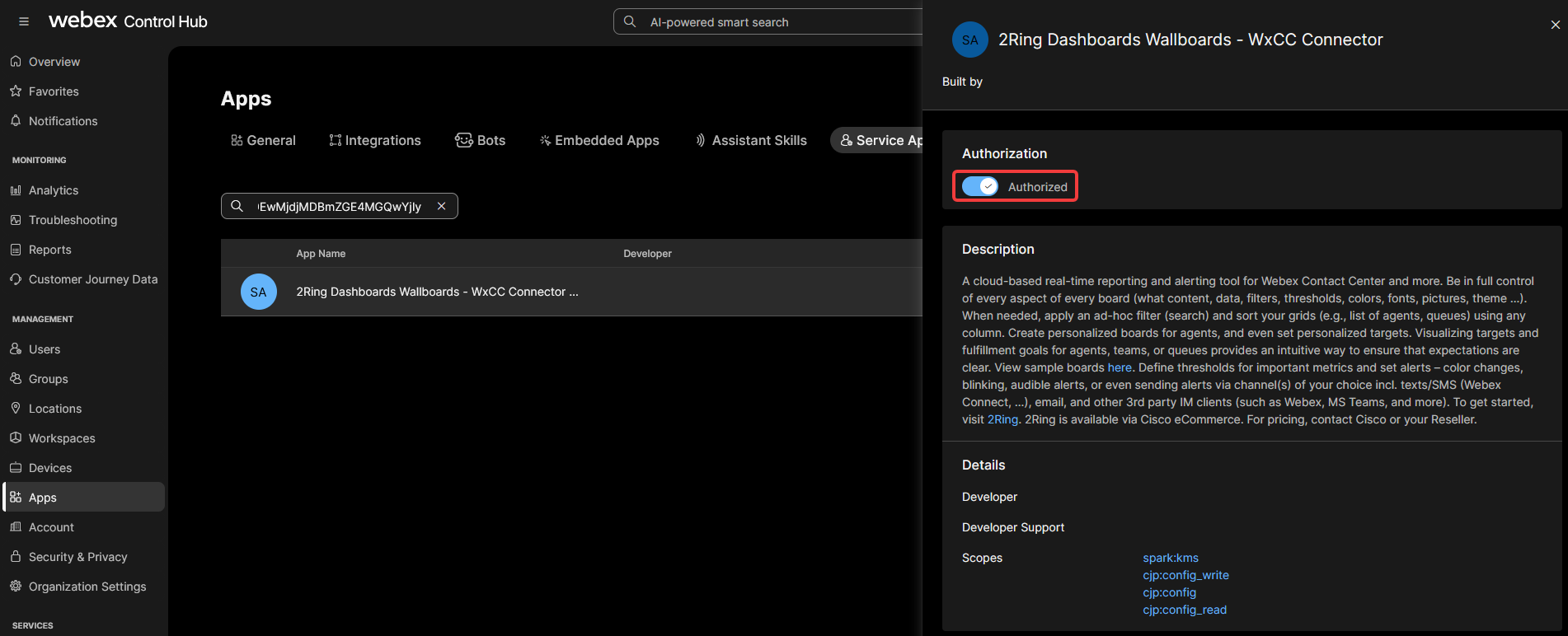
In the Control Hub, navigate to Apps (in the Management section).
There, switch to the Service Apps section and find 2Ring Dashboards Wallboards – WxCC Connector. If necessary, you can also search by the App ID:
Y2lzY29zcGFyazovL3VzL0FQUExJQ0FUSU9OL0M5ZDI2YjljODQ1NGE5ZTgwY2NjYjExYmIxYWMyYTEzNzE0ZmJiODBhYTU5NzVmODEwMjdjMDBmZGE4MGQwYjIy
Enable the Authorized toggle.
Once completed, please notify 2Ring, providing the Webex Organization Name (available in Control Hub > Account > Info).