2.5. Connector Settings
In order to retrieve Unity related data, navigate to the Connectors tab in DW administration, choose the Unity connector and go to its SETTINGS… section.
Figure 1: Unity connector settings
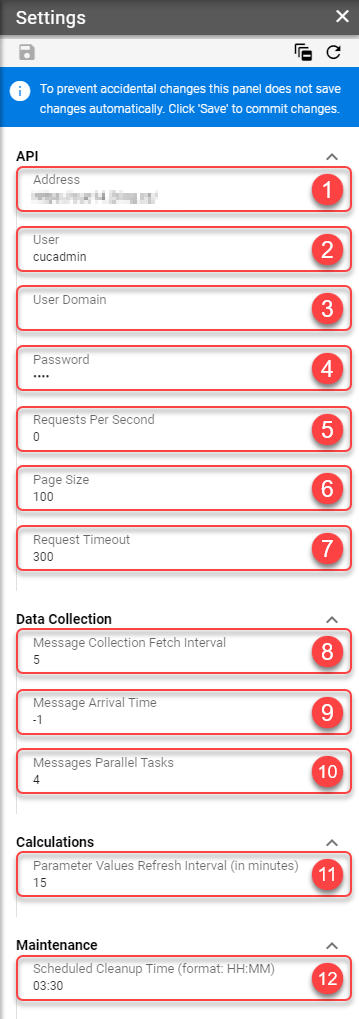
Address - Address of the primary Unity server.
User - Unity user that will be used to communicate with the Unity API.
User Domain - Domain of the Unity user.
Password - Password of the Unity user.
Requests Per Second - The maximum number of HTTP requests per second send to the Unity API (0 for unlimited).
Page Size - Maximum page size in API response.
Request Timeout - The number of seconds the Unity API has to respond to a request before it will be cancelled (0 for unlimited).
Message Collection Fetch Interval - How often should the connector pull list of messages from the Unity API (in minutes).
Message Arrival Time - How old messages will be collected from the Unity API (in hours).
Messages Parallel Tasks - The number of parallel requests used to pull data from the Unity API.
Parameter Values Refresh Interval (in minutes) - Parameter values refresh interval.
Scheduled Cleanup Time (format: HH:MM) - Time of day at which the connector cleanup procedure is ran. This cleans up any obsolete connector data from the database. The time must be specified in the connector’s timezone.