Connector License
A valid license is required for all connectors supplied by 2Ring.
To obtain a new commercial license for any 2Ring connectors, please contact your system integrator (SI) or reach out to 2Ring directly via any of the contacts listed on the 2Ring website at https://www.2Ring.com/contact.
License Validation
License validation is performed at the beginning of each connector iteration. The state of the license validation in your environment can be checked via the diagnostics layout which can be requested from 2Ring. For more information, reach out to 2Ring via support contacts listed on the 2Ring website at https://www.2Ring.com/contact.
License Validation Scenarios
The following scenarios describe possible license validation issues and recommended actions:
Expired License
Issue: If the license has expired, a license error message will appear in the client.

Action: To resolve this, contact 2Ring to extend or renew your license.
Exceeded License Count
Issue: If the number of purchased licenses is exceeded, a license error message will appear in the client.

Action: You can either use the license filter to reduce the number of active licenses or contact 2Ring to purchase additional licenses.
License Filters
The Five9 connector has a Skills-based license filter.
By default, when a license is added to the connector, the connector counts all agents that are logged in the Five9 and displays data for all agents, campaigns and skills. When a license filter is applied, the connector will only count agents, that have assigned skills matching the license filter as well as display data only for agents, campaigns and skills matching the license filter.
License Computing
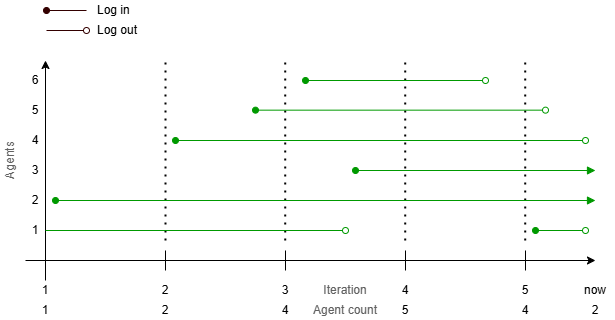
The licenses are computed based on all agents that are logged in concurrently to the data source platform. If license filters are applied, the connector will only count agents that match the license filter.
Figure 2: Image that graphically describes how the licenses are computed.