Connector License
A valid license is required for all connectors supplied by 2Ring.
To obtain a new commercial license for 2Ring connectors please contact your system integrator (SI) or reach out to 2Ring directly via any of the contacts listed on our website at https://www.2Ring.com/contact.
License Validation
License validation is performed at the beginning of each connector iteration. You can review the current license validation status in your environment, along with peak usage values from the past two months, by opening the License Overview layout. This layout is typically located in the Default Business Unit on your DW tenant.
If you are unable to locate the mentioned layout, or for more information, please contact 2Ring via the support contacts listed on the 2Ring website at https://www.2Ring.com/contact.
License Filters
Supported license filters in UCCE connector are “skillGroups”, “precisionQueues” and “callTypes”.
By default, when a license is added to the connector, the connector counts all agents that are logged in the UCCE. The connector can be filtered to count agents in specific skill groups, precision queues and call types at the same time, filter the calculations to provide data for only those skill groups, precision queues and call types.
If the license filter is filled in, and a calculation does not have this license filter as a parameter, but has other license filter parameters, the calculation will return an error “Calculation is incompatible with configured license filters”.
Example:
KPI Calls - Handled for Precision Queues will work if no filter is filled or the precisionQueues filter is filled
KPI Calls - Handled for Call Types will not work, if the precisionQueues filter is filled
KPI Agents - Logged In will always work, because it has skillGroups, precisionQueues and callTypes as parameters
Grid DialerCalls will always work, because it has no parameters, that belong to license filters.
License Computing
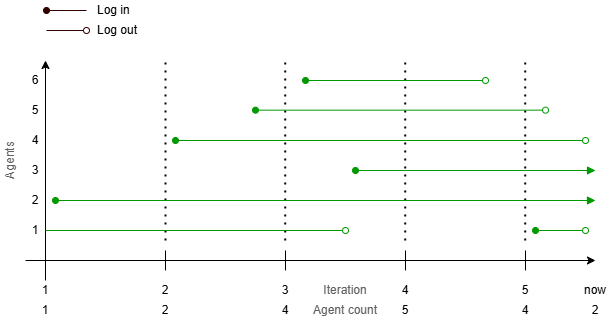
The licenses are computed based on all agents that are logged in. If license filters are applied, the connector will only count agents that match the license filter.
Figure 1: Image that graphically describes how the licenses are computed.