
What’s New in Release 2602
2Ring Dashboards & Wallboards
Welcome to the 2602 release of 2Ring Dashboards & Wallboards. This document provides an overview of all new features and improvements included in this update, along with guidance on how to locate, enable, and use each one.
Read on to discover what’s new.
In This Release
Manual Paging Mode in Grids
Expanded Layout Options: New Shapes
Quick Access to 2Ring Support and Services from the Main Menu
Hybrid Connectors for On-Prem Contact Centers
AI Assistant Extended with Historical Reporting Knowledge
Historical Reporting Now Accessible from the Layout Client
Manual Paging Mode in Grids
Users can now pause automatic paging and manually navigate through pages within grids. This is especially useful when monitoring large contact centers where a single agent state grid may list hundreds of agents.
Previously, grids would automatically cycle through pages on a set timer, making it difficult to review a specific page in detail. With manual paging enabled, you are in full control of which page is displayed.
What it looks like
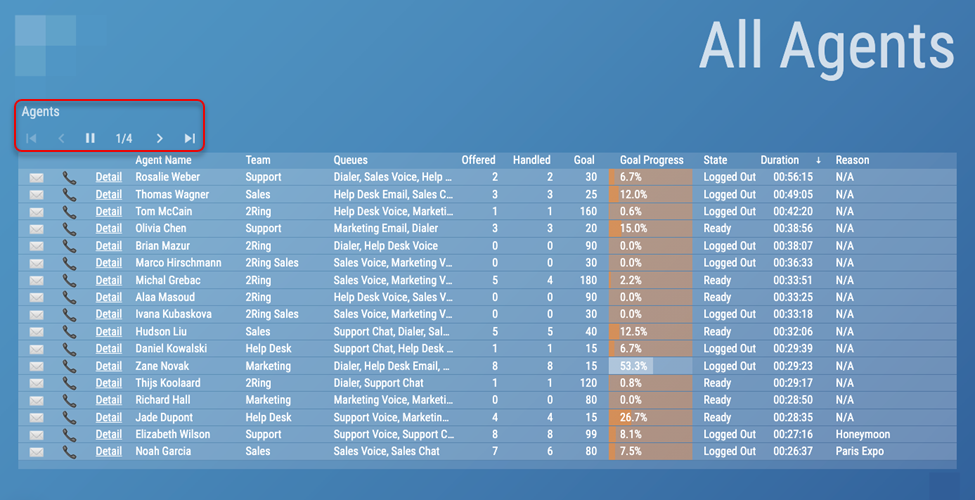
Below is an example of the grid UI with the manual paging controls visible:
Figure 1: Grid view showing manual paging navigation controls
How to enable Manual Paging Mode
Manual paging must be enabled per grid by a Business Unit (BU) admin. Follow these steps:
Open the Layout Editor for the layout that contains the grid you want to update.
Click on the grid widget to select it, to open its settings.
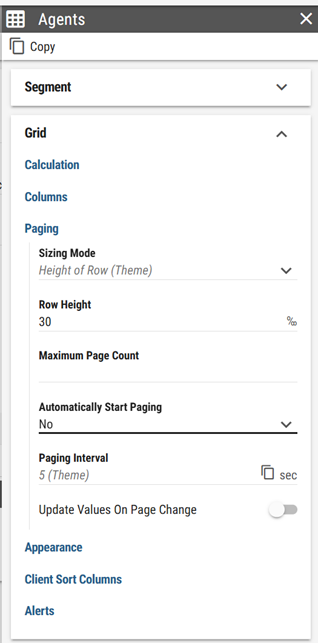
Locate the Automatically Start Paging setting and switch it to No.
Figure 2: Grid settings showing Automatically Start Paging option
Resize the grid if necessary to accommodate the paging controls that will appear at the top.
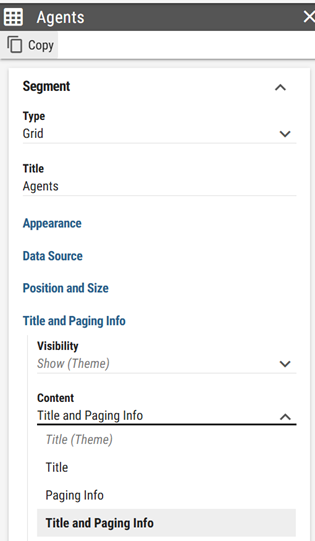
If you do not see the paging controls, make sure the paging info is displayed by configuring the Title and Paging Info as shown on this image:
Figure 3: Grid settings showing Title and Paging Info configuration
Save the layout.
For full configuration details, refer to the full description:
Expanded Layout Options: New Shapes
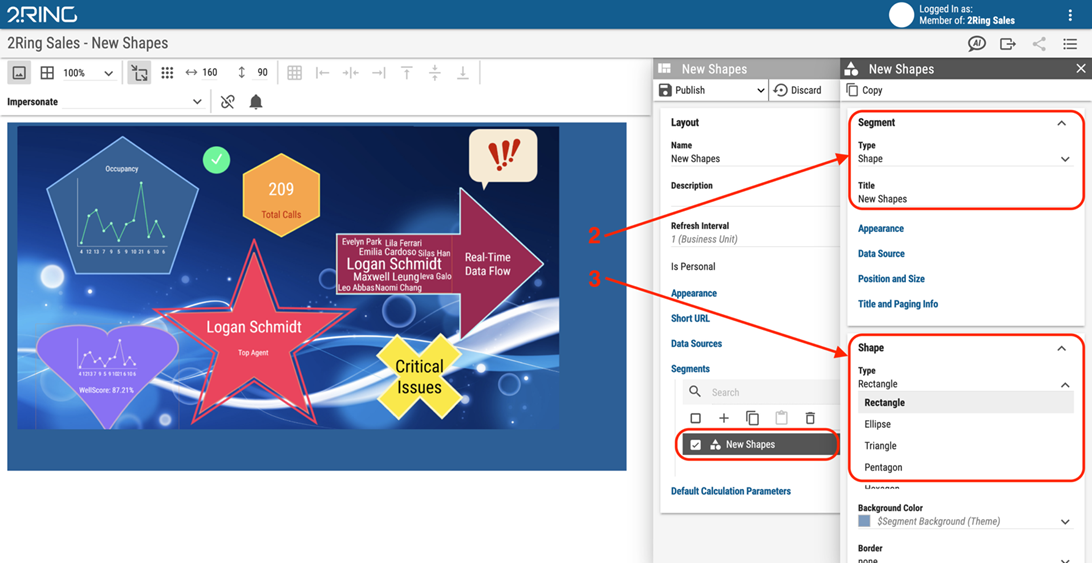
A fresh collection of shapes is now available in the Layout Editor.
Figure 4: Layout demonstrating new shape options
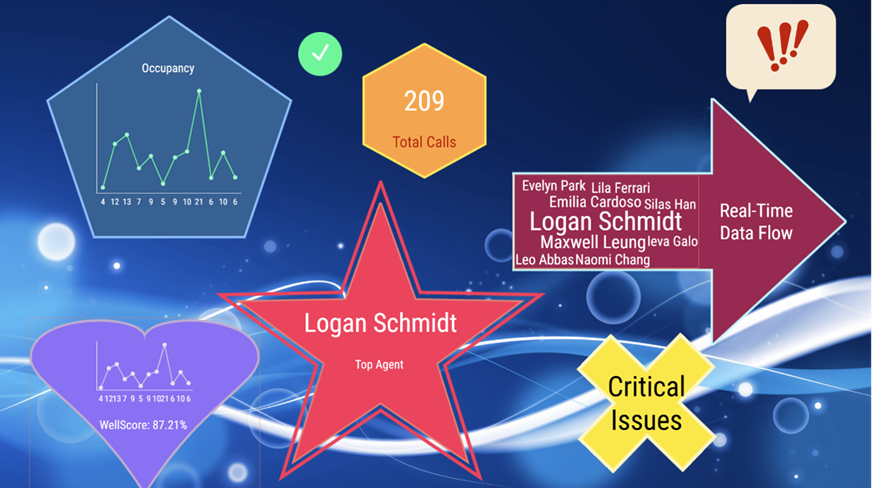
These new shapes give you more flexibility when designing dashboards and wallboards, allowing you to create visually structured, professional-looking layouts with greater creative freedom.
How to use the new shapes
Follow these steps to add a shape to your layout:
Open the Layout Editor for any layout.
In the Segments toolbar, click the Shapes button.
Scroll the updated Type shape library.
Click a shape to add it to the canvas, then drag and resize as needed.
Use the Shape formatting options to adjust color, and border style.
Figure 5: Accessing the shape library in the Layout Editor
For more information, visit:
Quick Access to 2Ring Support and Services from the Main Menu
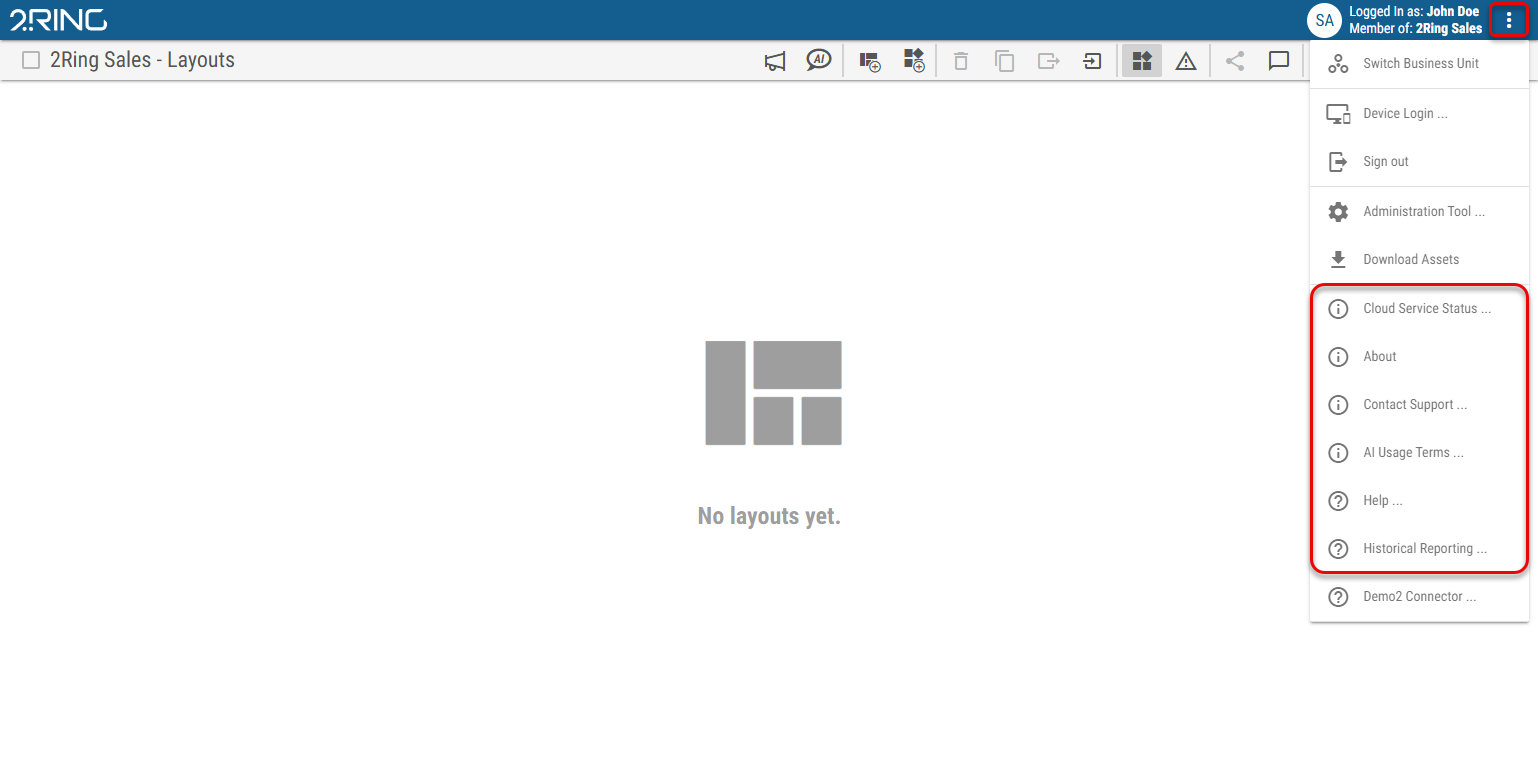
The main menu has been expanded with several new quick links, making it easier to access support, check service status, and navigate to key features all without leaving the application. The menu is accessible by clicking the three-dot icon (⋮) in the top-right corner of any screen.
How to access the new links
The links are accessible from any screen in the application:
Click the three-dot icon (⋮) in the top-right corner of the screen.
Scroll down in the menu to find the relevant item: Contact Support …, Cloud Service Status …, Help …, Historical Reporting …, or AI Usage Terms …
Click either link. The respective page will open in a new browser tab.
Figure 6: New support and service links in the main menu
Direct links: Support Contacts | Cloud Service Status
Hybrid Connectors for On-Prem Contact Centers
If you have questions or would like to get started with any of these connectors, please visit our Support page and our team will be happy to help.
2Ring continues to expand its hybrid connector capabilities, bringing the full power of 2Ring Cloud to customers running Cisco’s on-premises contact center platforms. This release adds support for UCCX alongside the already supported PCCE, UCCE, and Webex Contact Center Enterprise.
A new, hybrid connector mode is now available for the Generic SQL Connector and the Generic Web Service Connector, making it possible to surface data from internal databases and private APIs in 2Ring Cloud without exposing them to the internet.
All hybrid connectors run locally within your infrastructure and communicate securely with 2Ring Cloud using outbound-only HTTPS connections. No inbound firewall rules are required, and sensitive data never leaves your network boundary.
Supported platforms
UCCE (Unified Contact Center Enterprise, also covers PCCE and Webex Contact Center Enterprise) - View Docs
UCCX (Unified Contact Center Express) - View Docs
SQL – View Docs
Web Service – View Docs
How it works
The hybrid connector is installed on a server within your on-premises network. It connects to your contact center data source and sends only the data that is being actively displayed in 2Ring Dashboards & Wallboards to the cloud, everything else stays on-premises.
Generic SQL Connector in Hybrid Mode
The Generic SQL Connector can now be deployed in Hybrid Mode using the Remote Connector framework. This is designed for environments where databases must remain within the customer’s local infrastructure while dashboards and wallboards are hosted in 2Ring Cloud.
This is particularly useful when integrating with legacy databases, sensitive data warehouses, or internal systems that cannot be directly exposed to the internet. It provides a secure way to make SQL-based business metrics visible in the cloud without compromising compliance or data residency requirements. Raw database access remains fully protected within the local environment at all times.
Generic Web Service Connector in Hybrid Mode
The Generic Web Service Connector can also operate in Hybrid Mode using the same Remote Connector framework. This deployment option is designed for scenarios where data must remain within a customer’s on-premises environment while still being made available for cloud-hosted dashboards and wallboards.
Hybrid Mode provides an ideal balance between local data privacy and the flexibility of cloud-based dashboards. It is especially useful when integrating with internal APIs or web services that cannot be exposed directly to the cloud, or when compliance and data residency requirements mandate that data stays on-premises.
AI Assistant Extended with Historical Reporting Knowledge
The AI Assistant has been enhanced to include documentation from the Historical Reporting Module.
You can now ask questions related to historical reports, report configuration, and reporting features directly inside the application. The AI Assistant provides context-aware answers and references relevant documentation to help you find detailed information when needed.
Historical Reporting Now Accessible from the Layout Client
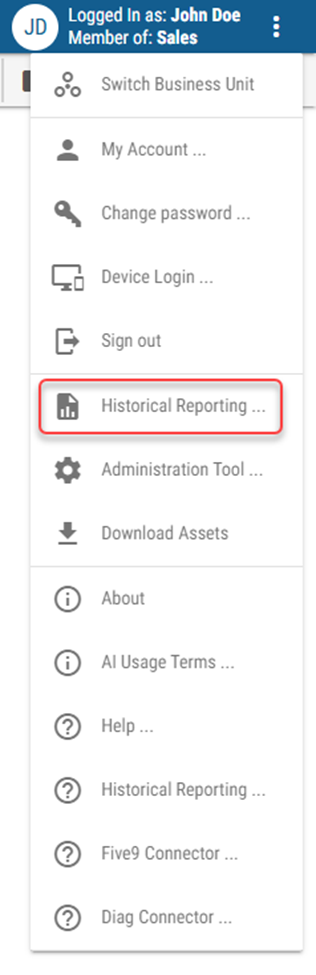
A new link to launch the Historical Reporting Module has been added directly to the layout client.
Customers with Historical Reporting enabled will now be able to quickly navigate to the list of reports provided by the Historical Reporting Module without leaving the layout client.
Figure 7: New Historical Reporting link in the layout client
Try It Now
All 2602 features are available on the public 2Ring Cloud demo platform. You can explore them anytime, no installation required.
Need help?
Support: www.2ring.com/support
Cloud Status: www.2ring.com/StatusCloud