
License
A valid license is required for all connectors supplied by 2Ring.
To obtain a new commercial license for 2Ring connectors please contact your system integrator (SI) or reach out to 2Ring directly via any of the contacts listed on our website at https://www.2Ring.com/contact.
In DW administration under Connectors tab is a list of imported connectors. Connector with some errors (for example a license is missing, expired) is displayed with red text color.
Figure 1: License tab
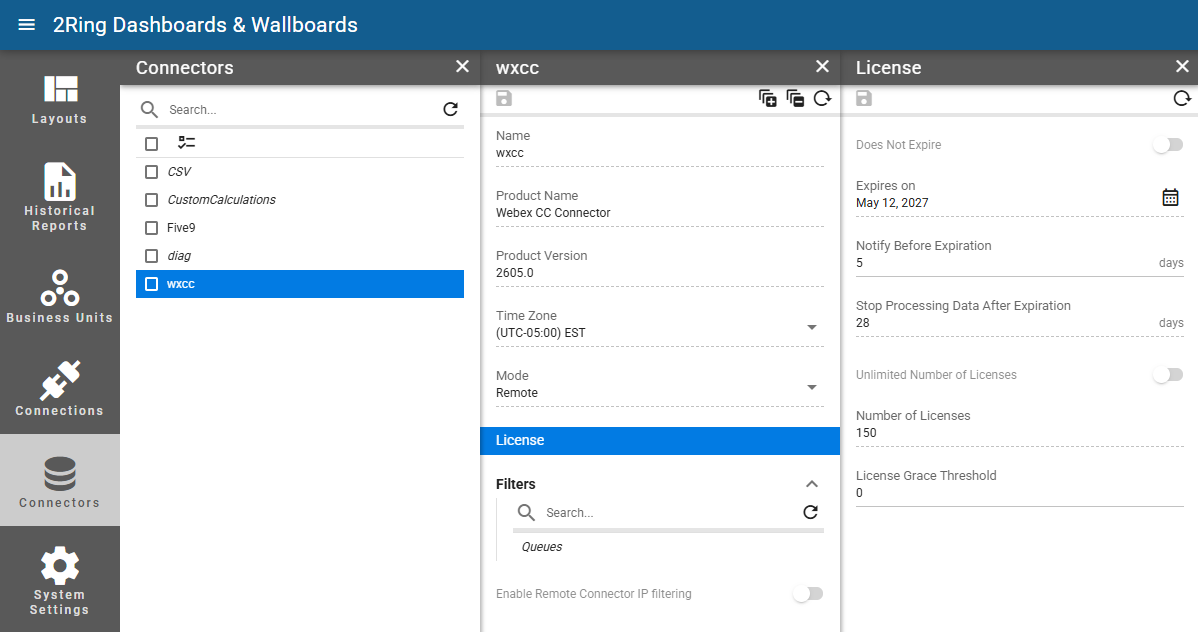
Does Not Expire
Read-only
Whether the license expires or not.Expires on
Not available if the license does not expire.
Read-only
The date when the license expires.Notify Before Expiration
Not available if the license does not expire.
The number of days before the expiration date when the user should be notified by a notification in a snackbar.
Stop Processing Data After Expiration
Not available if the license does not expire.
Read-only
The number of days after the expiration date when the connector stops processing data.Unlimited Number of Licenses
Read-only
Whether the number of licenses that can be consumed by logged in agents is unlimited.Number of Licenses
Available only when the number of licenses is limited.
Read-only
The number of licenses that can be consumed by logged in agents.License Grace Threshold
Available only when the number of licenses is limited.
The number of licenses that can be exceeded before a warning is displayed in the client.