
Calculation Parameter Type Groups
A Parameter Group is a collection of values of an enumerable calculation parameter type. A parameter group can be used in a calculation parameter to calculations that accept group parameters.
Groups are usually used for grouping multiple rows of a grid into a single row. However, the calculation type determines how it uses a parameter. Some calculations may use a group for filtering.
Refer to the connector calculation documentation for more details.
Name
Required
The name of a group.Calculation Parameter Type
Required
Type of calculation parameter which group is associated with.Values
List of available values for selected Calculation Parameter Type where each value can be added to the group.
Example
Within the company, it was decided that statistics will be displayed as an aggregation of all sub departments (Invoicing, Orders, Returns) into one group named Sales. To do so, group Invoicing, Orders and Returns department into a single Sales department.
Figure 1: Original grid.
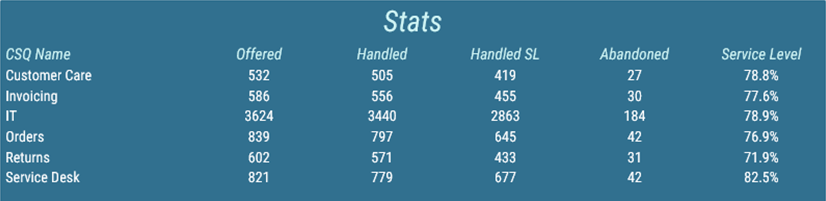
Figure 2: Configuration of calculation parameter type group in administration tool.
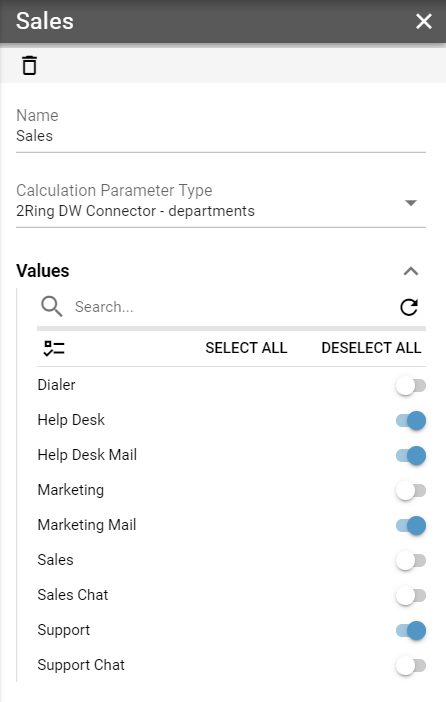
Figure 3: Configuration of grid’s parameter in Layout editor.
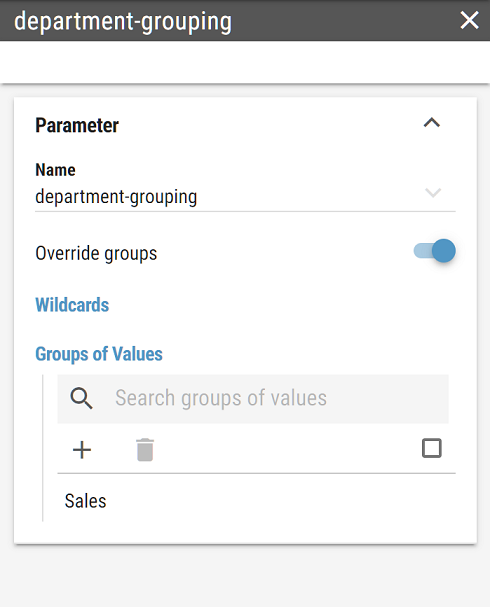
Figure 4: Grouped grid.

Notice that in grouped grid, values shown in Sales row are sums of values of configured sub departments.