
What’s New in This Release
This release brings two powerful updates designed to assist you in enhancing productivity, usability, and navigation across the 2Ring Dashboards & Wallboards platform.
Whether you’re configuring layouts, managing data, or exploring new capabilities, these additions make the experience faster, smarter, and more interactive than ever before.
AI Assistant: Help When You Need It, Right Inside the App
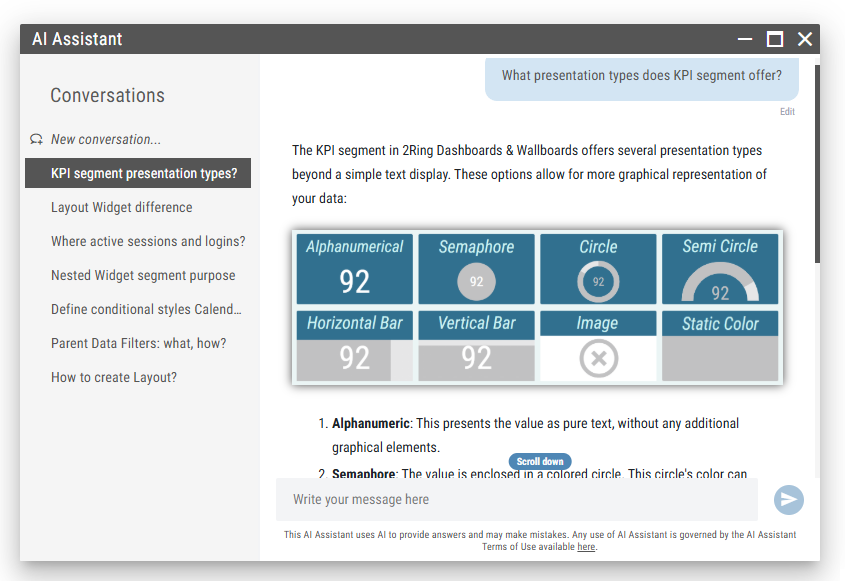
The AI Assistant is your new built-in companion across the Layout Viewer, Layout Editor, and Layout List. It searches the 2Ring database to respond to your question prompts about Layouts, Widgets, the Administration Tool, and even specific Connectors — all in plain language.
Need help configuring a segment? Want to understand how a feature works? Just open the AI Assistant from the bottom-left corner of your screen and ask.
Key capabilities:
Available directly inside the DW interface — no need to leave the app or search through external docs.
Understands and provides responses to prompts in natural language, making it accessible for both new and advanced users.
Supports conversation history, which survives page reloads and logouts.
Offers context-aware help, meaning responses are tailored to your prompt (including any description you provide of the environment or connectors).
Every response provided by AI Assistant includes a list of source links to official DW documentation, so you can dig deeper if needed.
Responses can be quickly copied to clipboard (including the prompt, AI Assistant’s response and sources) for sharing or saving.
Examples of what you can ask:
“What is the difference between a Layout and a Widget?”
“Where do I find my active sessions and logins?”
“How can I define conditional styles for a Calendar segment?”
“What are Parent Data Filters and how do they work?”
“How can I switch Business Unit in the layout editor?”
“How do I add a new data source to a layout?”
For more information, see the AI Assistant chapter.
Remote Connectors: Seamless Hybrid Integration
With the introduction of Remote Connectors, 2Ring Dashboards & Wallboards now supports secure hybrid deployments.
Remote Connectors allow you to run connectors within your local infrastructure, even though the rest of the DW platform is hosted in the cloud. These connectors perform outbound-only HTTPS communication to send data securely to the 2Ring Cloud, ensuring that no inbound firewall rules are needed.
This architecture gives you the best of both worlds — data privacy and control on your premises, and powerful visualization and configuration tools in the cloud.
Key Benefits
Keep most of your data local – Only data that is being shown in 2Ring Dashboards & Wallboards is sent securely to the cloud.
Access cloud dashboards from anywhere – While sensitive systems remain protected inside your network.
No inbound access required – Only outbound HTTPS traffic is used, simplifying firewall and security policies.
Compatible with various data sources – Works with on-premise databases, REST APIs, and contact center platforms.
Remote Connectors are especially useful for customers with:
Legacy or isolated systems that must remain on-prem.
Multiple environments distributed across different networks or geographies.