
IP Filters
Access to layout and content viewing and management can be restricted by whitelisting only specific IP addresses.
Access can be restricted separately to four different application areas:
Layout and Content Files Management
Layout Viewing - Authenticated
Layout Viewing - Anonymous
Admin Tool
All four application areas contain the same settings:
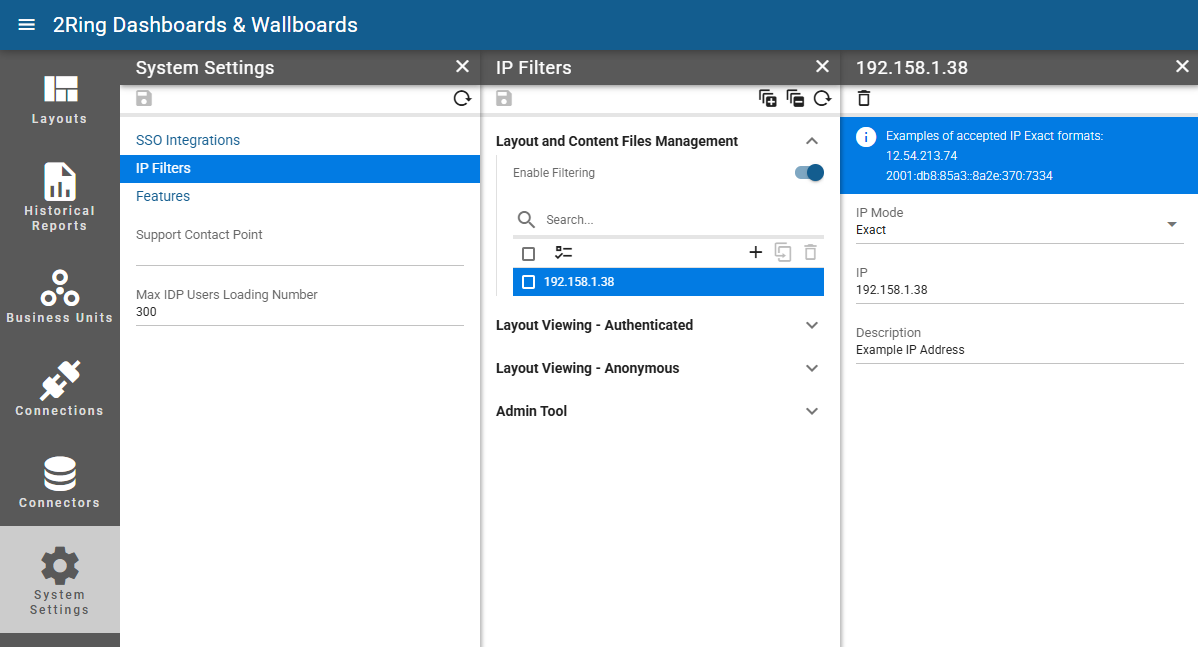
Enable Filtering
Whether access to the specific application area is restricted to specific IP addresses.IP Mode
The way an IP address is defined.Exact - An exact IP address.
List - Comma separated list of IP addresses.
Range - Range of IP addresses.
Subnet - IPv4 or IPv6 subnet.
IP
Available only when “Exact” is selected as an IP Mode.
An IP address.IPs
Available only when “List” is selected as an IP Mode.
Comma separated list of IP addresses.Start IP/End IP
Available only when “Range” is selected as an IP Mode.
Specifies the range of IP addresses.IP Subnet
Available only when “Subnet” is selected as an IP Mode.
IPv4 or IPv6 subnet.Description
Description of the IP address.