
Borders Style
The style, width and color settings for the segments borders. The style of the border can be set by clicking on one of the available styles from the list on the left side of the panel. Width of the border, defined in per mille of the layouts height, can be set by editing the width field. Color can be set in HEX or RGB format by editing a text field or by opening a color dropdown. Since the inheritance applies to a whole group of settings in this dropdown, changing any of these settings overrides the inheritance. A user can apply the inherited settings by clicking on an “Inherit” button. Value can be copied by clicking the copy button that appears when you hover over the dropdown. The copied value can then be pasted only in another border style field.
Figure 1: Border Style
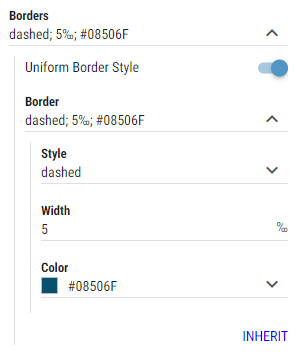
Uniform Border Style
Whether border should be applied as a single border around the entire segment.Border
Available only when “Uniform Border Style” is enabled.
The style, width and color of the border.Top
Available only when “Uniform Border Style” is disabled.
The style, width and color of the top border.Bottom
Available only when “Uniform Border Style” is disabled.
The style, width and color of the bottom border.Left
Available only when “Uniform Border Style” is disabled.
The style, width and color of the left border.Right
Available only when “Uniform Border Style” is disabled.
The style, width and color of the right border.