2Ring Dashboards & Wallboards Layout Viewer and Editor Guide Version: 2505
Home Working with the Layout Editor Controls Dropdown
  • Overview
  • Quick Start
  • Logging in
  • Account Management
  • What is a Layout
  • What is a Widget
  • Working with the Layout List
  • Working with the Layout Editor
    • Panels
    • Sections
    • Groups
    • Controls
      • Value Field
      • Dynamic Value field
      • Dropdown
      • Color field
      • Borders Style
      • Text Style
      • Shadow Style
      • Custom Display Format
      • Expression builder
    • Lists
    • Inherited Values
    • Validation
    • Keyboard Shortcuts
  • Editing a Layout
  • Local Notification Permissions
  • Static Content
  • Devices and Integrations
  • Troubleshooting

Quick search

Dropdown

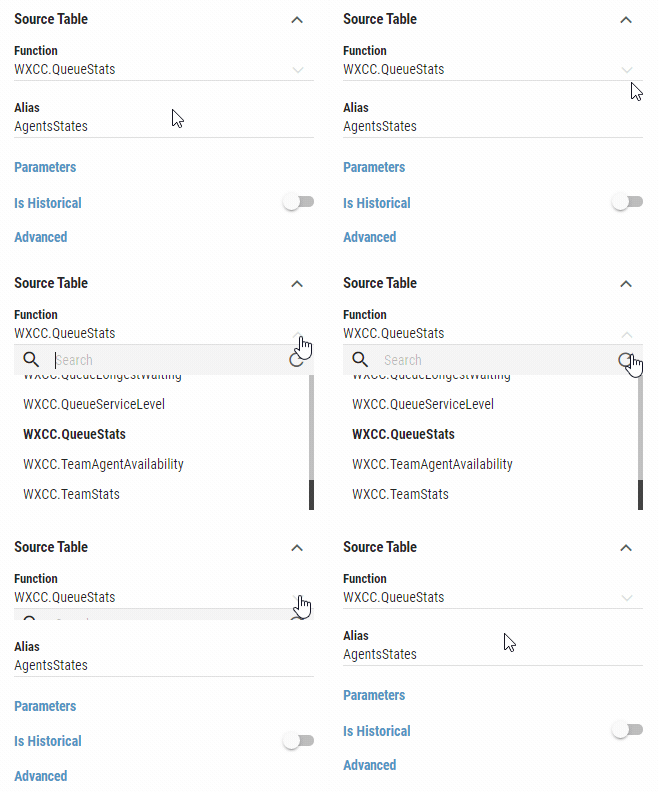
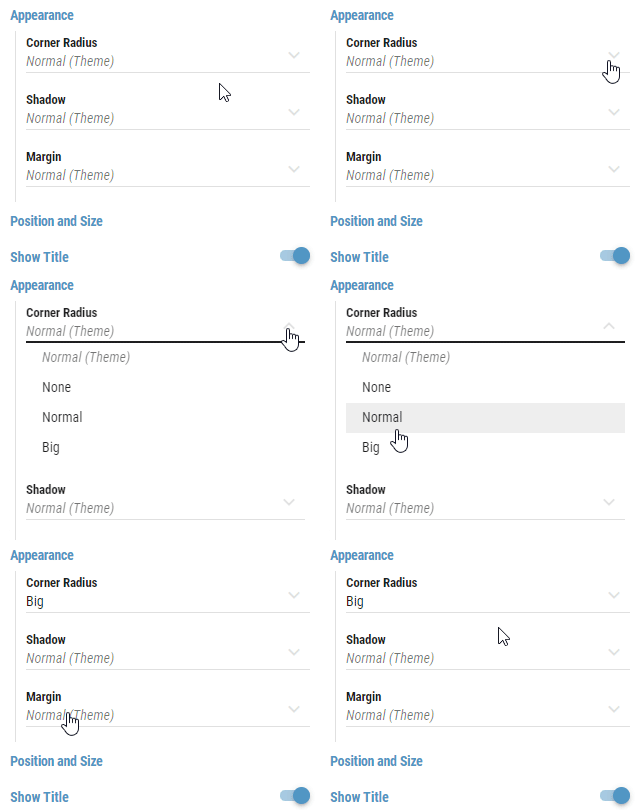
Contain a selection of predefined values, the user can choose from. The value cannot be manually edited. User can also navigate in the dropdown list using arrow keys on the keyboard and confirm the selection by pressing the Enter key. The currently selected value is highlighted in bold.
Dropdowns may contain a search field, that is displayed right under the dropdown, when it’s rolled out. Items can be filtered based on the search criteria. Inserted search phrase can be cleared by pressing the button. Some Dropdowns contain dynamic values, that may change while it is opened. Such dropdowns can be refreshed using the refresh button.

Figure 1: Rolled out dropdown
../../_images/fields-dropdown.gif

Figure 2: Refreshable dropdown

../../_images/fields-dropdown-refresh.gif
Dynamic Value Field
Color field