
Dynamic Value Field
Some fields can have their value assigned dynamically at runtime instead of at configuration time. To setup field to have dynamic value click the toggle next to the field label.
Figure 1: Dynamic value toggle
After clicking the toggle additional options can be configured.
Figure 2: Dynamic Value options
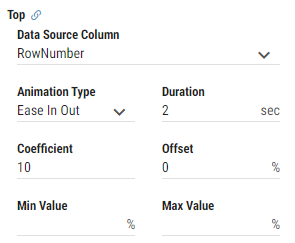
Data Source Column
Column from associated data source from where value is being taken. Dynamic value field requires data source and its row filters to be configured outside of the field.Animation Type
Determines how the change of value is animated.None
Ease
Ease In
Ease out
Ease In out
Linear
Step Start
Step End
Duration
Specifies how long animation takes. Measured in seconds.Coefficient
The value that is assigned to the field is calculated as:
(Value From Data Source * Coefficient) + OffsetOffset
The value that is assigned to the field is calculated as:
(Value From Data Source * Coefficient) + OffsetMin Value
Sets the minimum value assigned to the field.Max Value
Sets the maximum value assigned to the field.
All dynamically assigned values can be temporary disabled while editing layout by clicking the toggle located in preview toolbar. While disabled statically assigned values will be applied.
Figure 3: Disable/enable dynamic field values
