
Shadow Style
A special type of a field, allowing user to adjust the shadow of the segment. Value can be copied by clicking the copy button that appears when you hover over the dropdown. The copied value can then be pasted only in another shadow style field. Since the inheritance applies to a whole group of settings in this dropdown, changing any of these settings overrides the inheritance. A user can apply the inherited settings by clicking on an “Inherit” button.
Figure 1: Shadow style field
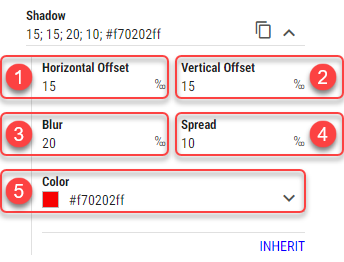
Horizontal Offset
Horizontal distance of the shadow from the segment. Measured in permilles of the entire Layout’s height.Vertical Offset
Vertical distance of the shadow from the segment. Measured in permilles of the entire Layout’s height.Blur
A shadows blur. Measured in permilles of the entire Layout’s height.Spread
Distance by which to expand a shadow in all directions. Measured in permilles of the entire Layout’s height.Color
For more information see Color field section.
Color of the shadow.