
Text Style
A special type of a field, that defines the font to use and whether bold or italic text should be used. Value can be copied by clicking the copy button that appears when you hover over the dropdown. The copied value can then be pasted only in another text style field.
Figure 1: Text style field

The text style control can be opened by clicking the text style icon on the right side of the field. The text style control consists of two panels: A list of predefined text styles on theme (Figure 16) and a text style editor (Figure 17).
Figure 2: List of Text styles
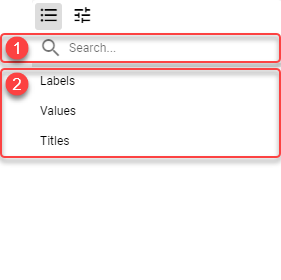
Search box
Theme text styles can be filtered using the search box. When no search phrase is entered, all available text styles are displayed. Otherwise only text styles containing the entered phrase are displayed.
Theme text styles
Text styles defined on current theme. For more information, see Text Styles chapter.
Figure 3: Text style editor
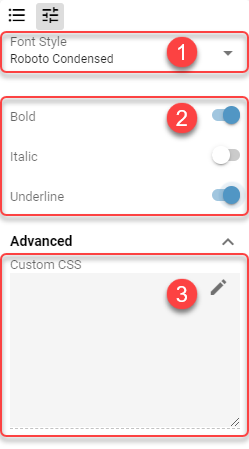
Available Fonts
List of available fonts. Custom font can be defined by typing into the dropdown.
Bold/Italic/Underline
Whether bold, italic, or underlined text should be used.
Custom CSS
Customize the text using a CSS properties. Example:
text-decoration: underline;
text-decoration-color: green;
text-decoration-style: solid;
Makes the text look like following: